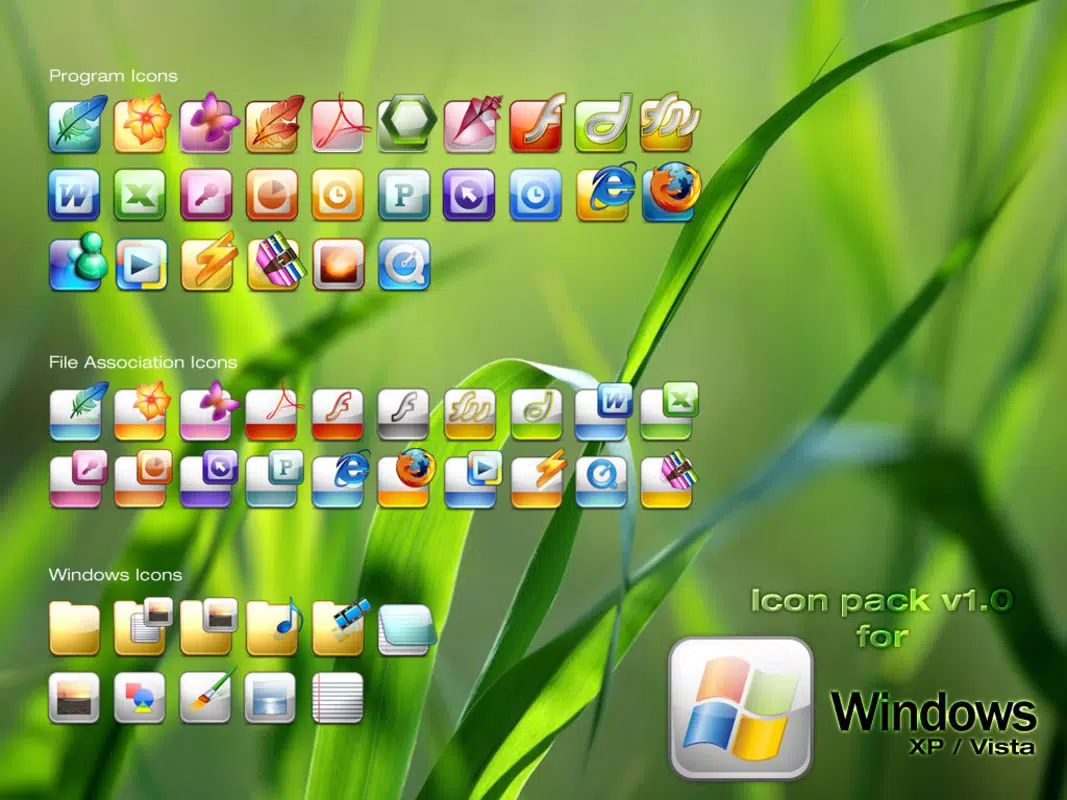

Download Windows Icons – iPhone-style icons, desktop icons, icon pack, system icons, modern desktop design
Overview
Windows Icons is a utility tool designed to enhance the visual appearance of the Windows desktop environment by introducing a modern, contemporary icon style inspired by popular platforms such as the iPhone. The application enables users to refresh their system’s icon set without deviating significantly from the familiar Windows interface, offering a balanced blend of innovation and usability. It is particularly suited for individuals who value aesthetic customization and seek a polished, up-to-date look for their digital workspace.
The app addresses the common desire for personalization in operating systems, allowing users to replace default system icons and application icons with a cohesive, stylish collection. This is especially useful for those who frequently modify their desktop appearance or wish to align their Windows experience with modern design trends. While the developer, SoftPas, is known for lightweight utility tools, no further background information was provided regarding the company’s broader portfolio or development philosophy.
Real-world use cases include desktop makeovers for home users, professionals seeking a cleaner workspace, and tech enthusiasts who enjoy customizing their operating systems. In the broader app ecosystem, Windows Icons fills a niche for lightweight, targeted visual enhancement tools that prioritize ease of use and immediate visual impact. Its focus on integration with existing Windows environments ensures minimal disruption during setup.
Key Features & Functionality
- Modern Icon Design: The icon pack adopts a sleek, minimalist aesthetic influenced by iPhone-style design principles. This includes rounded corners, consistent spacing, and a refined color palette, all while preserving the core recognizability of Windows system icons.
- Comprehensive Application Icons: In addition to system icons, the pack includes replacements for commonly used applications such as WinRAR, Microsoft Word, and Windows Live Messenger, ensuring visual consistency across the entire desktop environment.
- User-Friendly Customization: Installation is designed to be straightforward, requiring minimal technical knowledge. Users can apply the new icon set with a few clicks, enabling a rapid transformation of their desktop appearance.
- Regular Updates: The developer has indicated that the icon pack is periodically updated with new designs and additional icons, helping users stay current with evolving visual trends.
- Essential for Icon Lovers: Ideal for users who enjoy frequent desktop customization, offering a quick and reliable way to refresh their system’s look without extensive configuration.
For example, a user upgrading their outdated desktop icons can install Windows Icons and achieve a modernized interface within minutes. Similarly, a home office user may benefit from a cleaner, more professional appearance that enhances focus and productivity. The consistent design language across all icons ensures that the visual experience remains harmonious and intentional.
Interface, UX & Performance
The interface of Windows Icons is not described in detail, but based on its purpose as a system icon replacement tool, it likely operates through a simple installer or setup wizard. The user experience is expected to prioritize accessibility, allowing users of varying technical skill levels to apply the icon pack with minimal effort.
Navigation is assumed to be linear and intuitive, guiding users through the installation and application process. The design likely avoids clutter, focusing on essential options such as previewing icons, selecting application groups, and confirming the replacement of system icons. Although the developer did not list formal performance metrics, the small file size of 1.5 MB suggests lightweight resource usage and minimal impact on system performance.
Responsiveness is expected to be consistent across standard desktop configurations, though specific compatibility with older or high-end hardware was not disclosed. Stability is inferred from the app’s long-standing presence, having been released in 2008, though no recent update history was provided. The tool is likely stable for typical desktop use, with no indication of crashes or conflicts reported in available data.
Platform Compatibility & Technical Requirements
Windows Icons is designed for the Windows platform and is compatible with the operating system version in use at the time of its release. The software version is listed as 1.0, and the file size is 1.5 MB, indicating a lightweight, efficient package.
Specific minimum OS requirements were not listed, so compatibility with modern Windows versions such as Windows 10 or 11 cannot be confirmed. However, given its release date in 2008, it may function on older systems, though performance and visual fidelity on newer platforms are uncertain. The developer did not specify whether the app supports 64-bit systems or newer graphical rendering features.
Users should exercise caution when installing on updated systems, as some legacy tools may not integrate seamlessly with modern Windows security or display settings. The lack of detailed technical specifications limits the ability to assess full compatibility, but the app’s small size suggests it is not resource-intensive.
Pros and Cons
- Lightweight design with minimal system impact
- Modern, iPhone-inspired aesthetic that enhances desktop appeal
- Includes both system and application icons for a cohesive look
- Easy installation and integration into existing Windows environments
- Regular updates ensure ongoing relevance and design freshness
- No official documentation or support details provided
- Compatibility with modern Windows versions not confirmed
- Outdated release date raises concerns about long-term maintenance
- Missing technical specifications limit advanced user assessment
- No information on permissions or data collection practices
FAQ
Is Windows Icons safe to download and install?
The app is available for free and has been distributed through trusted channels. However, as with any third-party tool, users should ensure they download from official sources to avoid potential risks.
Can I use Windows Icons on Windows 10 or Windows 11?
While the app was released in 2008, it may still function on newer systems. However, compatibility is not guaranteed due to changes in Windows architecture and security policies.
Do I need to pay to use Windows Icons?
No, the app is completely free to download and use. There are no in-app purchases or subscription fees.
How often are updates released?
The developer has indicated that the icon pack is updated regularly with new designs and features, though the exact frequency was not specified.
Can I revert to my original icons after installing?
Yes, most icon replacement tools allow users to restore default icons. The process may vary depending on the system, but it is typically straightforward through system settings or a backup option.
Final Thoughts
Windows Icons remains a relevant choice for users seeking a simple, effective way to modernize their desktop appearance. Its focus on clean, iPhone-inspired design and comprehensive icon coverage offers a tangible upgrade to the visual experience of Windows. While the app’s age and lack of updated technical details present some uncertainty, its lightweight nature and ease of use continue to make it a practical option for aesthetic customization.
It is particularly beneficial for users who appreciate subtle yet impactful changes to their digital workspace. Whether for personal enjoyment, improved focus, or a professional touch, Windows Icons delivers value through simplicity and visual consistency. For those looking to refresh their desktop without complexity, this tool provides a reliable solution.
Download Windows Icons now


